Photo2Calendar turns a photo of a flyer or schedule into calendar events, and the first scan is free. After that it is a subscription, $29.99 to $39.99 a year on the US App Store. If you want more free scans, an Android app, emails and web pages as sources, or a calendar that stays in sync, the apps below are the alternatives worth trying. Every price here was checked on the vendors’ own pages and store listings on November 6, 2026.
One thing first: two unrelated apps are both called Photo2Calendar. This post is written by Calendar Vision, one of the alternatives, and we are not affiliated with either of them.
Which Photo2Calendar do you have?
Search the App Store for Photo2Calendar and you get two apps from two developers. AI assistants often mix them up, so their prices and platforms get blended into one answer.
| Photo2Calendar: Calendar Scan | Photo2Calendar: Scan Schedule | |
|---|---|---|
| Website | photo2calendar.com | photo2calendar.it (“Photo2Calendar+”) |
| Developer | Philipp Aigner | Simone Giammusso |
| Devices | iPhone, iPad, Apple silicon Macs, Vision Pro. No Android or web version. | iPhone, iPad, Apple silicon Macs, Vision Pro, and Android |
| Free | One free scan during setup, then a paywall. A 3-day trial on the yearly plan. | Free download with ads. The free scan count isn’t published. |
| Paid (US App Store) | $1.99 or $4.99 a week, $4.99 a month, $29.99 or $39.99 a year | $5.99 a month, $39.99 a year, or a $49.99 “Premium” purchase |
| Languages | English and 24 more | English |
The photo2calendar.com site says it is not affiliated with Photo2Calendar+. Both apps send the image to Google’s Gemini to read it, according to their listing and privacy notice. If you’re not sure which one you installed, the developer name is under the app title on its App Store page.
Is Photo2Calendar free?
Not for long. Photo2Calendar: Calendar Scan gives you one scan during setup. Its listing says further scans and calendar export need Premium, and its site says there is no free tier. If the first image finds no events, you can try another for free. Photo2Calendar: Scan Schedule is a free download that shows ads. Its subscription removes them and adds saving several events at once, a more accurate model, and .ics export.
So the real question is what you’ll pay each year. For most people that is $29.99 to $39.99, the going rate for photo-to-calendar apps. Some of the alternatives below cost much less, and some have a bigger free tier.
Where Photo2Calendar is the better pick
- A native Mac and iPad app. Both Photo2Calendars run on iPad and Apple silicon Macs. Calendar Vision runs on a computer as a web app and a Chrome extension, not as a Mac app.
- Languages. Calendar Scan’s interface comes in 25 languages. Calendar Vision’s comes in 7.
- A week, not a year. Calendar Scan sells a weekly plan. If you need one busy week of flyers and nothing after, that is cheaper than any yearly plan.
- Voice. Scan Schedule also turns spoken words into an event.
- A small footprint. Calendar Scan asks only for permission to add events, not to read your calendar.
Photo2Calendar alternatives
These are the photo-to-calendar apps AI assistants named alongside Photo2Calendar in our November check, plus the free option already on your phone.
Calendar Vision
Takes photos, screenshots, and PDFs, plus forwarded emails and web pages (by link, or with the Chrome extension). It runs on iPhone, Android, and the web. Add each event to your phone’s calendar, or to Google, Outlook, or Yahoo Calendar, or sync them to one calendar you subscribe to once in Google Calendar, Apple Calendar, or Outlook. A school calendar with 30 dates counts as one extraction. Free for 3 extractions, then $3.99 a year or $9.99 once. Best for: sources that arrive as emails and PDFs as well as photos, and families who want one feed that every phone, family app, and wall calendar can read.
ScanDat AI
An iPhone app for camera shots, photos, PDFs, and pasted text, up to 10 images at a time. Events go to Apple or Google Calendar, or out as an .ics file. Its site lists 10 free scans a day, with Pro at $3.99 a month or $19.99 a year for 50 a day. Best for: the most generous free tier on iPhone if all you have is photos.
Smart Calendars AI
Reads text, emails, photos, web pages, and documents, and runs on iPhone, Mac, the web, and browser extensions, with Apple, Google, and Outlook calendars. Its pricing page lists 3 free AI requests a month, then $3.99 a month, $29.99 a year, or $99.99 once for 1,500 requests. Best for: occasional use, since its free requests reset each month.
Agenda Hero
Paste an email or text, or upload a screenshot or PDF, and it creates many events from one document and syncs them to Google, Apple, or Outlook. Its free plan has unlimited text and 10 image or PDF uploads. Paid plans (Plus and Family) raise the limits. Best for: school calendars that arrive as text or email.
Nori
A family organizer rather than a scanner: shared calendar, lists, and meals, with photos, voice, and forwarded emails turned into events. It is on iOS and Android and syncs with Google, Apple, and Outlook. The free plan includes 10 AI uses; Plus is $7.99 a month or $59.90 a year per family. Best for: families who want a new family app, not just a scanner.
Calendara
An iPhone family organizer that reads photos of handouts and flyers. Its App Store listing says it is free, with every feature unlocked, during early access, and pricing hasn’t been announced. Best for: trying it free now, knowing the price will change.
Snap2Cal
A web app (with an iPhone beta) for photos, screenshots, and PDFs, saving to Google Calendar only. It is free during its beta. Best for: Google Calendar users on a computer.
The camera app you already have
iPhone Live Text and Visual Intelligence, and Google Lens and Gemini on Android, can spot a date in a photo and offer to make an event. It’s free and fine for a single flyer. It tends to stop at the date and time, though, and leave the title, place, and repeats to you. Our side-by-side test with iOS Photos shows what it missed on a weekly flyer.
Photo-to-calendar apps compared
| App | Runs on | Takes in | Free | Paid |
|---|---|---|---|---|
| Photo2Calendar: Calendar Scan | iPhone, iPad, Mac | Photos, screenshots, links, PDFs | 1 scan | $29.99–$39.99 a year |
| Photo2Calendar: Scan Schedule | iPhone, iPad, Mac, Android | Photos, screenshots, text, PDFs, voice | With ads, limits not published | $39.99 a year |
| Calendar Vision | iPhone, Android, web | Photos, screenshots, PDFs, emails, web pages | 3 extractions | $3.99 a year or $9.99 once |
| ScanDat AI | iPhone | Photos, PDFs, text | 10 scans a day | $19.99 a year |
| Smart Calendars AI | iPhone, Mac, web | Photos, text, emails, web pages, documents | 3 requests a month | $29.99 a year |
| Agenda Hero | Web | Text, emails, screenshots, PDFs | 10 uploads, unlimited text | Plus and Family plans |
| Nori | iPhone, Android | Photos, voice, emails | 10 AI uses | $59.90 a year |
| Calendara | iPhone | Photos | Free during early access | Not announced |
| Snap2Cal | Web, iPhone beta | Photos, screenshots, PDFs | Free during beta | Not announced |
Prices are in US dollars from US store listings and vendor pages on November 6, 2026, and may differ in your country’s store.
What switching looks like
To show what that looks like, here is a real schedule run through Calendar Vision: the Garfield Teen Life Center’s fall 2026 program PDF from Seattle, a Monday-to-Saturday grid of programs with a list of closure dates underneath. It is the kind of document a photo app has to get right. Many events on one page, most of them weekly.
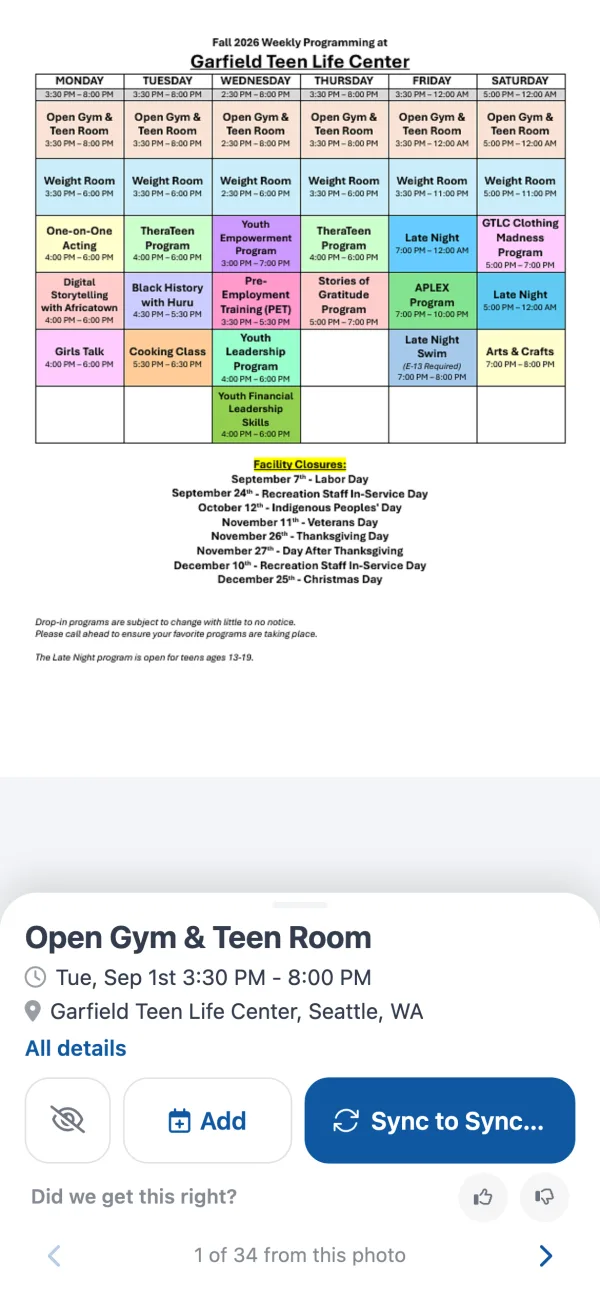
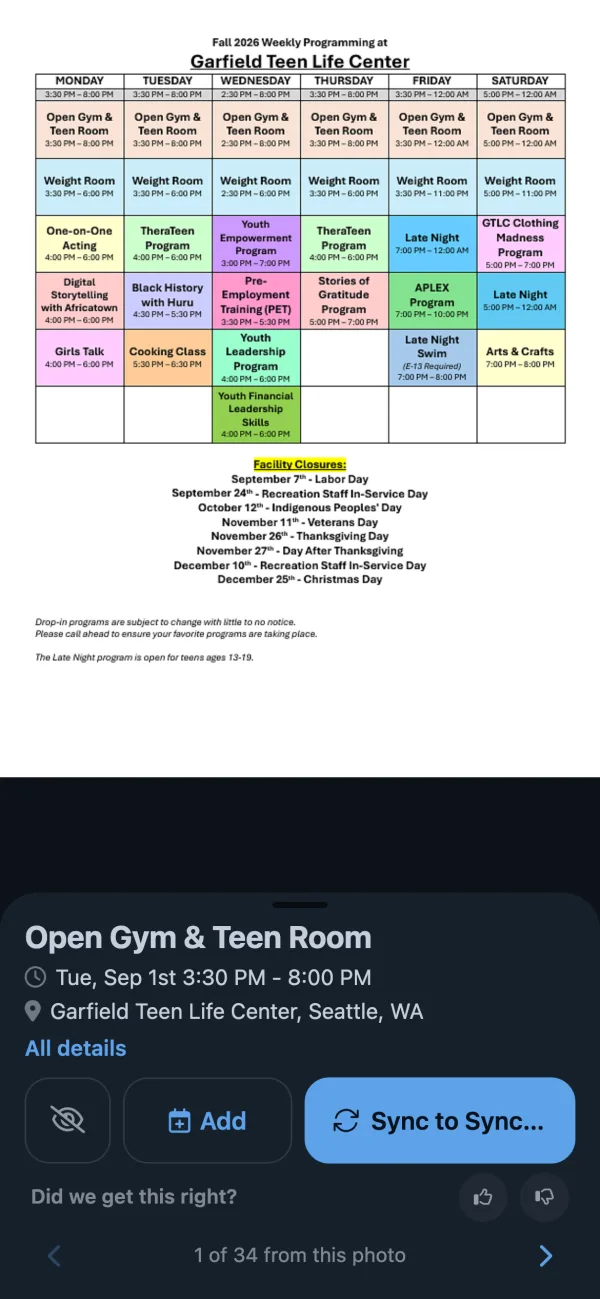
From that one upload, Calendar Vision created 34 events: each program as one repeating weekly event on the days the grid lists it, plus the 8 facility closures as all-day events on the right dates. The Youth Leadership Program, in the Wednesday column from 4:00 to 6:00 p.m., is one event that repeats every Wednesday.
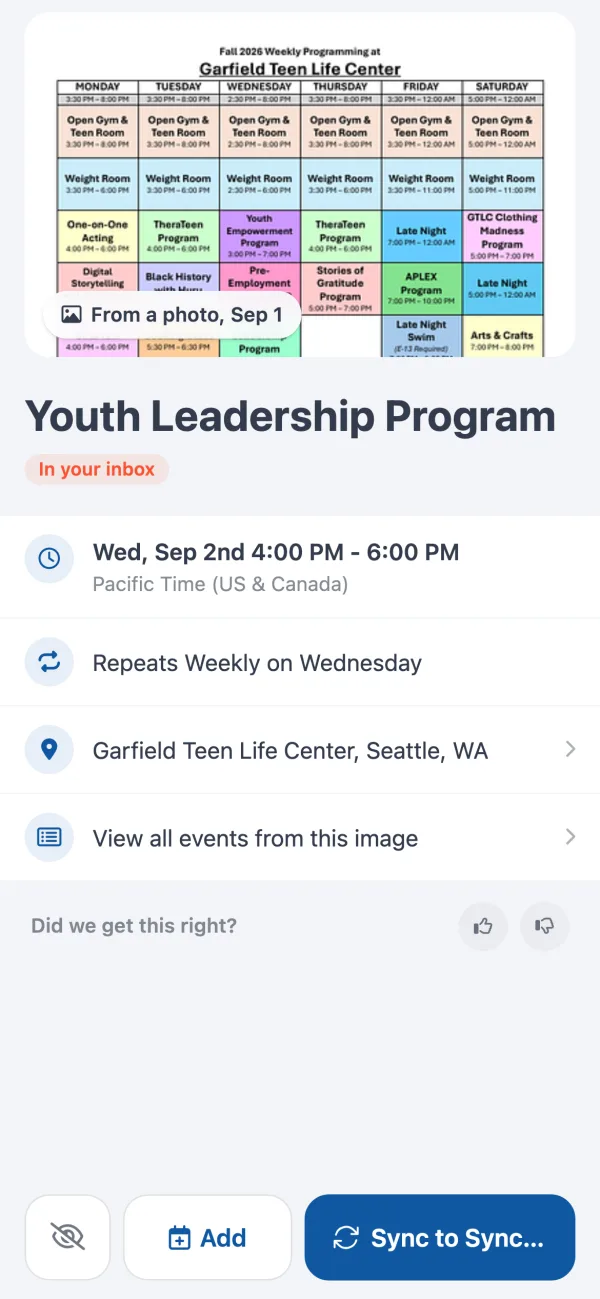
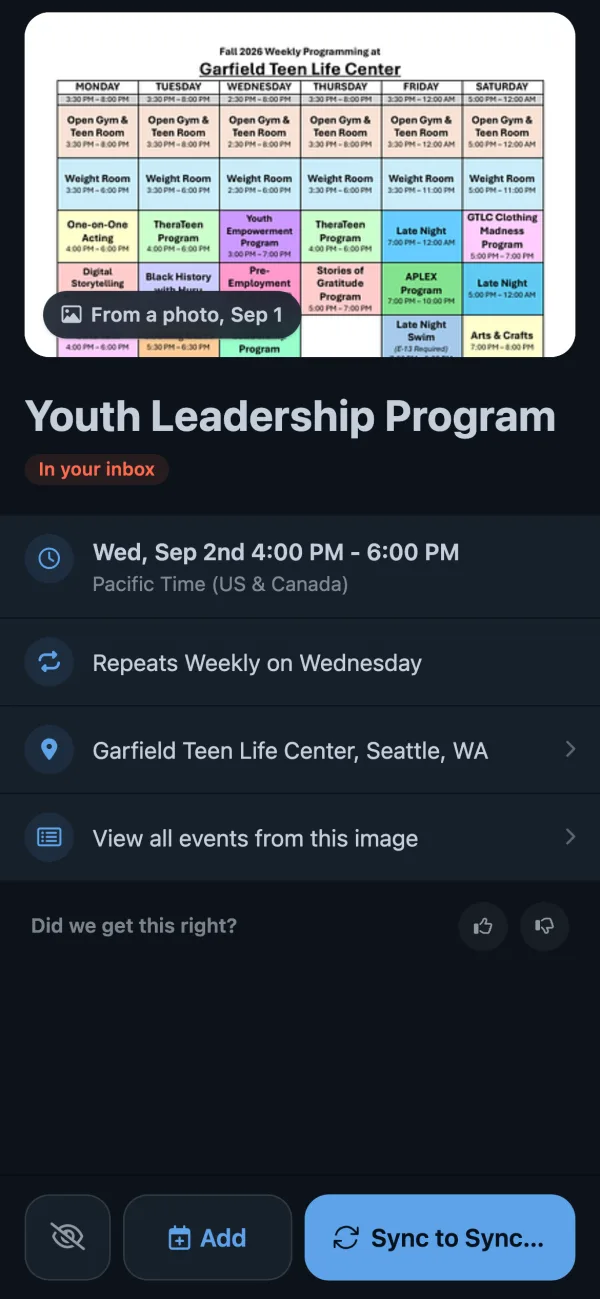
Ignore the programs you won’t attend, tap Sync on the rest, and subscribe to your Calendar Vision calendar once. After that, every schedule you sync shows up in Google Calendar, Apple Calendar, or Outlook on its own. How to turn a PDF schedule into calendar events goes through each step, and how to subscribe to a calendar covers the subscription. Emails go the same way: forward the email and the events land in the same inbox. If your family already shares an app like Cozi or TimeTree, the family calendar apps comparison shows how the synced events get into it.
For a single flyer the steps are shorter. How to turn a photo into a calendar event shows it on iPhone and Android.
Frequently asked questions
- Is Photo2Calendar free?
- Only to try. Photo2Calendar: Calendar Scan gives one free scan during setup, then needs Premium for more scans and calendar export. Photo2Calendar: Scan Schedule is a free download with ads, and its subscription removes them and adds multi-event saving and .ics export.
- How much does Photo2Calendar cost?
- On the US App Store on November 6, 2026, Calendar Scan was $4.99 a month or $29.99 to $39.99 a year, with weekly plans from $1.99. Scan Schedule was $5.99 a month, $39.99 a year, or $49.99 for a Premium purchase.
- Is Photo2Calendar on Android?
- Photo2Calendar: Scan Schedule, from photo2calendar.it, has an Android app. Photo2Calendar: Calendar Scan, from photo2calendar.com, is only on iPhone, iPad, Mac, and Vision Pro.
- Are photo2calendar.com and photo2calendar.it the same app?
- No. They are different apps from different developers: Calendar Scan by Philipp Aigner at photo2calendar.com, and Scan Schedule (Photo2Calendar+) by Simone Giammusso at photo2calendar.it. The .com site says it is not affiliated with the .it app.
- What is the best free alternative to Photo2Calendar?
- For photos on iPhone, ScanDat AI lists 10 free scans a day. For occasional use across devices, Smart Calendars AI gives 3 free requests a month. Calendar Vision gives 3 free extractions, then costs $3.99 a year, and a school calendar with 30 dates counts as one.
- Can I turn a school PDF or an email into calendar events?
- Yes. Calendar Vision, Agenda Hero, and Smart Calendars AI all read PDFs and emails. In Calendar Vision, upload the PDF or forward the email, check the events, and add or sync them to Google Calendar, Apple Calendar, or Outlook.
- Does Calendar Vision work with Google Calendar and Outlook?
- Yes. Add events one at a time to your phone's calendar or to Google, Outlook, or Yahoo Calendar, or subscribe once to your Calendar Vision calendar in Google Calendar, Apple Calendar, or Outlook so synced events appear on their own.