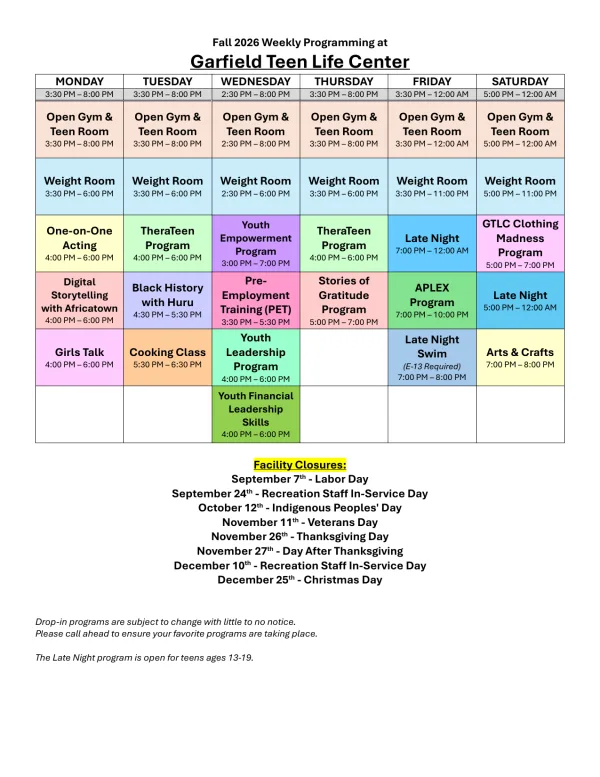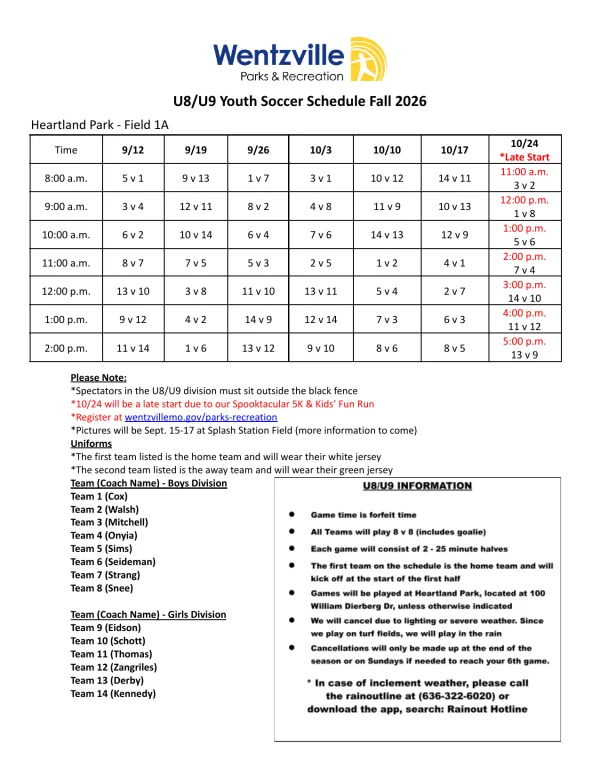
The alternatives to a Skylight Calendar fall into three groups: another wall display (Hearth, Cozyla, an Amazon Echo Show, or one of DAKboard’s screens), a screen you already own (an old tablet or a TV showing a shared Google calendar, for nothing), or a screen you build yourself (DAKboard or MagicMirror on a Raspberry Pi). Which one is better depends on what your family needs: a touchscreen the kids will actually use, no subscription, or the lowest price. Whatever shows the calendar, the school’s emails and PDFs still have to get onto it, and the last section covers that.
This guide is written by the people who make Calendar Vision, a tool that reads events out of photos, PDFs, emails, and web pages. We don’t make a display, and we haven’t used the devices below, so everything about them comes from each vendor’s own store pages and help center, checked on November 6, 2026. Prices are in US dollars; they change often, and many of these shops run sales.
Is there a better option than the Skylight calendar?
There is no single better device, but there is a better fit for most families who are looking. Sorted by what you care about:
- Lowest cost: a tablet you already own, with Google Calendar open. It costs nothing.
- No subscription: Cozyla, which advertises no subscription, an Echo Show, a tablet, or a DIY screen.
- Morning and bedtime routines for kids: Hearth, which is built around them.
- The biggest screen: Cozyla’s 32-inch Calendar+ 2, or the 21-inch Echo Show.
- Someone in the house who likes projects: DAKboard or MagicMirror on a Raspberry Pi.
Skylight is still the better choice for some families, and it’s fair to say when. If you want the simplest touchscreen that everyone in the house will use without help, in a 15-inch size that fits a kitchen counter, Skylight is hard to beat at $299.99 for the Calendar 2. Its free tier covers more than people expect: the calendar, the sync with Google, Apple, Outlook, and calendar links, chores, lists, and profiles. You only pay for Skylight Plus, $79 a year, if you want meal planning, rewards, the photo screensaver, or Magic Import. Skylight also sold a 10-inch model for about $160 when we checked on November 5, which is the cheaper Skylight people ask about.
Other family calendar displays
These are the devices people compare Skylight with most. Each one shows the calendars you connect and adds its own extras.
Hearth Display
Price: a 27-inch touchscreen at $699, often $599 on sale (checked November 5), with a 120-day risk-free trial. Hearth’s site was running a 20% off sale on November 6. Subscription: the Family Membership is $9 a month, $86.40 a year, or less per year on two- and three-year plans, with the first 30 days free.
Hearth’s membership page says that without a membership you can “view your calendar, basic profile details, and settings,” while routines and task management need it. The same page also says a membership “is required to set up your Hearth Display,” so plan on at least the free month. Hearth connects “Google, iCal, and Outlook calendars for free,” plus TeamSnap, school district calendars, and other calendars by link. With the membership, Hearth Helper takes events you send in, such as “your weekly school lunch calendar,” and adds them after you approve them.
Hearth vs Skylight: Hearth is the bigger screen and the one built around kids’ routines, at a higher price than Skylight’s 15-inch. Its membership costs about the same per year as Skylight Plus, but more of Hearth needs it. If the morning rush is the bigger problem than the schedule, look at Hearth; if the calendar is the point, Skylight’s free tier does more.
Cozyla Calendar
Price: Cozyla’s site listed the 32-inch Calendar+ 2 at $899.99 on sale, the smaller Calendar Neo from $169.99, and a new Calendar Plus 3 in 24- and 32-inch sizes, whose price we couldn’t confirm on Cozyla’s site. Subscription: Cozyla markets its calendars as needing no subscription. Its homepage states the trial as both 30 days and 120 days, so check the terms at checkout.
Cozyla’s product page says the calendar “two-way auto-syncs with Google Calendar, Apple Calendar, Outlook Calendar,” and the Calendar+ 2 is an Android tablet inside, so it can run other apps and act as a photo frame. Cozyla doesn’t advertise an import for emails or PDFs.
Cozyla vs Skylight: Cozyla gives you a much bigger screen with no yearly fee, and costs more up front: $899.99 against $299.99. The Android tablet inside does more, and it also means more settings to manage. For a large wall in a busy kitchen, Cozyla; for a counter and the least fuss, Skylight.
Amazon Echo Show 15 or 21
Price: $299.99 for the Echo Show 15 and $399.99 for the Echo Show 21 at launch, both with a wall mount in the box. Amazon’s current prices change with its sales. Subscription: none for the calendar.
In the Alexa app you can link Google, Microsoft, and iCloud calendars, and Amazon’s help pages say each person’s profile can link their own and you can set a shared family calendar. iCloud needs an app-specific password from your Apple account. The calendar shows on the screen next to everything else an Echo Show does.
Echo Show vs Skylight: an Echo Show is a smart display first and a family calendar second. You get Alexa, video calls, and smart home controls, but not a chore chart or lists like Skylight’s. It’s a good pick if you want Alexa anyway.
DAKboard’s wall displays
DAKboard sells ready-made touchscreens, the Wall Display Touch 22 at $599.95 and the Touch 27 at $799.95, running the same DAKboard software described in the DIY section below. Most people who look at DAKboard build their own, which is where it’s cheapest.
Use a screen you already have
The cheapest Skylight alternative is the tablet in your kitchen drawer. An old iPad or Android tablet on a stand or a wall mount, plugged in, with Google Calendar or Apple Calendar open, shows the family’s week for nothing.
- Use a shared calendar. Every Google family group gets a shared Family calendar that everyone in the group can add to and edit, on iPhone and Android. Apple’s Family Sharing has one too. The tablet signs in to that calendar and shows it alongside the others.
- Keep the screen on. On an iPad, set Auto-Lock to Never in Settings, under Display & Brightness. On Android, set the screen timeout to its longest option in the Display settings. Keep it plugged in.
- Pick a week or schedule view. Google Calendar works in the app on an Android tablet or iPad, or at calendar.google.com in the tablet’s browser.
A TV or a spare monitor works too. DAKboard says “any internet-connected device with an up-to-date web browser can be used as a display,” and has guides for smart TVs and a Fire TV app, so its free plan can put a calendar on the TV you already have.
The honest limits: a tablet isn’t built to stay on all day, there’s no chore chart or meal plan unless you add another app, and the text is small from across a room. For many families that’s fine, and it’s the right way to find out whether you’d use a wall calendar before you buy one.
Build a DIY Skylight calendar
A DIY Skylight is a Raspberry Pi, a monitor, and free software that turns the monitor into a calendar. It takes an afternoon if you’ve done this kind of thing before.
DAKboard on a Raspberry Pi
DAKboard’s guide lists a Raspberry Pi (3B+ or 4B recommended), an 8 GB or larger SD card, and any monitor with an HDMI input, and DAKboard provides its Raspberry Pi system “for free to anyone.” It shows Google, Apple iCloud, Microsoft 365, and Facebook calendars, and “any online calendar that offers an ICS or iCal feed” by its public link.
DAKboard’s plans decide how much the screen can do:
- Free: one predefined screen, up to 2 calendars, DAKboard branding, and calendars refreshed every 60 minutes.
- Essential: $6 a month, or $5 a month billed yearly. Two custom screens, 5 calendars, refreshed every 30 minutes.
- Plus: $10 a month, or $8 a month billed yearly. Three screens, unlimited calendars, refreshed every 15 minutes.
DAKboard vs Skylight: a DIY DAKboard costs less up front if you already have a monitor, and the free plan covers a family with two calendars. It isn’t a touchscreen unless you buy one, and adding events on the screen works only for Google calendars with that feature turned on, so the family adds events on their phones. Skylight is the one you can tap.
MagicMirror²
MagicMirror² is free, open-source software maintained by volunteers. It runs on a Raspberry Pi 2, 3, 4, or 5 with the full Raspberry Pi OS. Its calendar module shows “any public accessible .ical calendar,” combines several, and checks them every 5 minutes by default. There’s no Google sign-in; you paste each calendar’s iCal link into a settings file. It’s read-only, and it’s for the family member who enjoys setting it up.
Comparison table
Prices from each vendor’s site on November 6, 2026, except where noted. Skylight’s prices in Canada, the UK, and Australia are in our Skylight Plus guide.
| Option | Upfront | Ongoing | Built-in import of emails and PDFs |
|---|---|---|---|
| Skylight Calendar 2 (15-inch) | $299.99 | Free; Plus $79 a year is optional | Magic Import, with Plus |
| Hearth Display (27-inch) | $699, often $599 on sale | Family Membership $9 a month or $86.40 a year | Hearth Helper, with the membership |
| Cozyla Calendar+ 2 (32-inch) | $899.99 on sale | None advertised | Not advertised |
| Echo Show 15 or 21 | $299.99 or $399.99 at launch | None for the calendar | No |
| A tablet you own | $0 | None | No |
| DAKboard on a Raspberry Pi | A Pi, an SD card, and a monitor | Free for 2 calendars; $5 to $10 a month for more | No |
| MagicMirror² | A Pi, an SD card, and a monitor | None | No |
Whatever screen you pick, the school schedule still has to get onto it
Look at the last column again. Skylight’s Magic Import and Hearth Helper are the only built-in ways on this list to turn a school email or PDF into events, and both are paid. Every other option shows what’s in the calendars you connect and nothing more, which means someone types in the school year, the swim meets, and the daycare closures by hand.
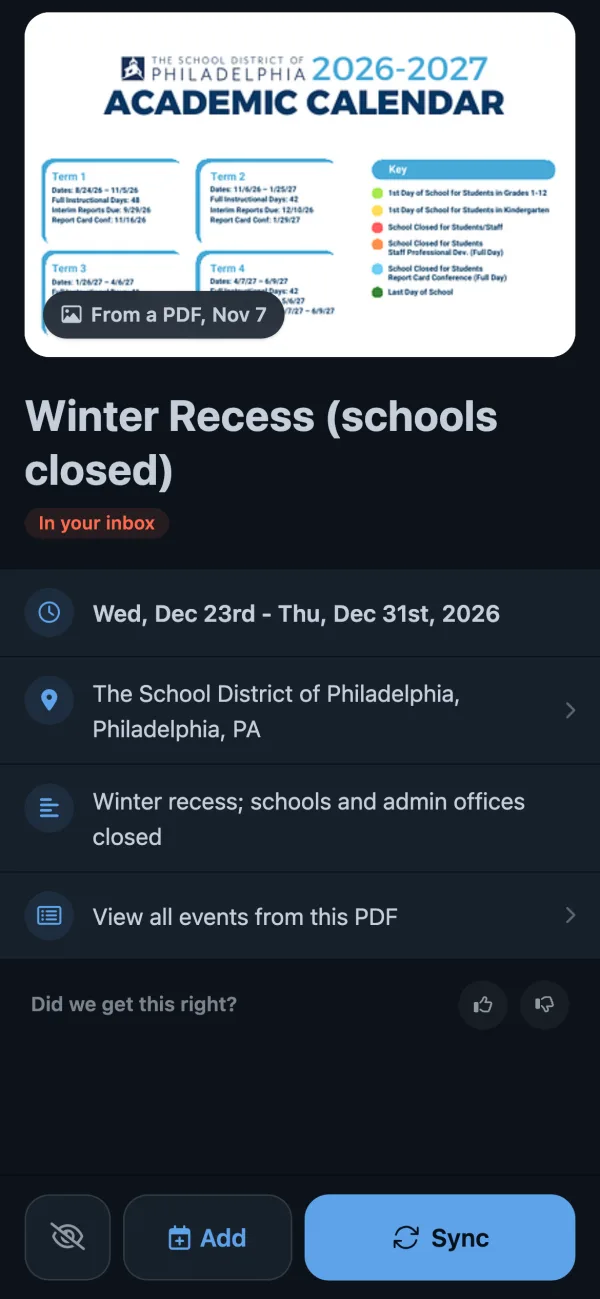
The way around that is the same for all of them. If something else turns the school’s PDF or email into events, and puts them in a calendar the screen already shows, they appear on the wall without typing. Calendar Vision does that part; it isn’t a display, and it works with any of the screens above. To show what that looks like, here is the Philadelphia school district’s 2026–27 calendar, a four-page PDF.
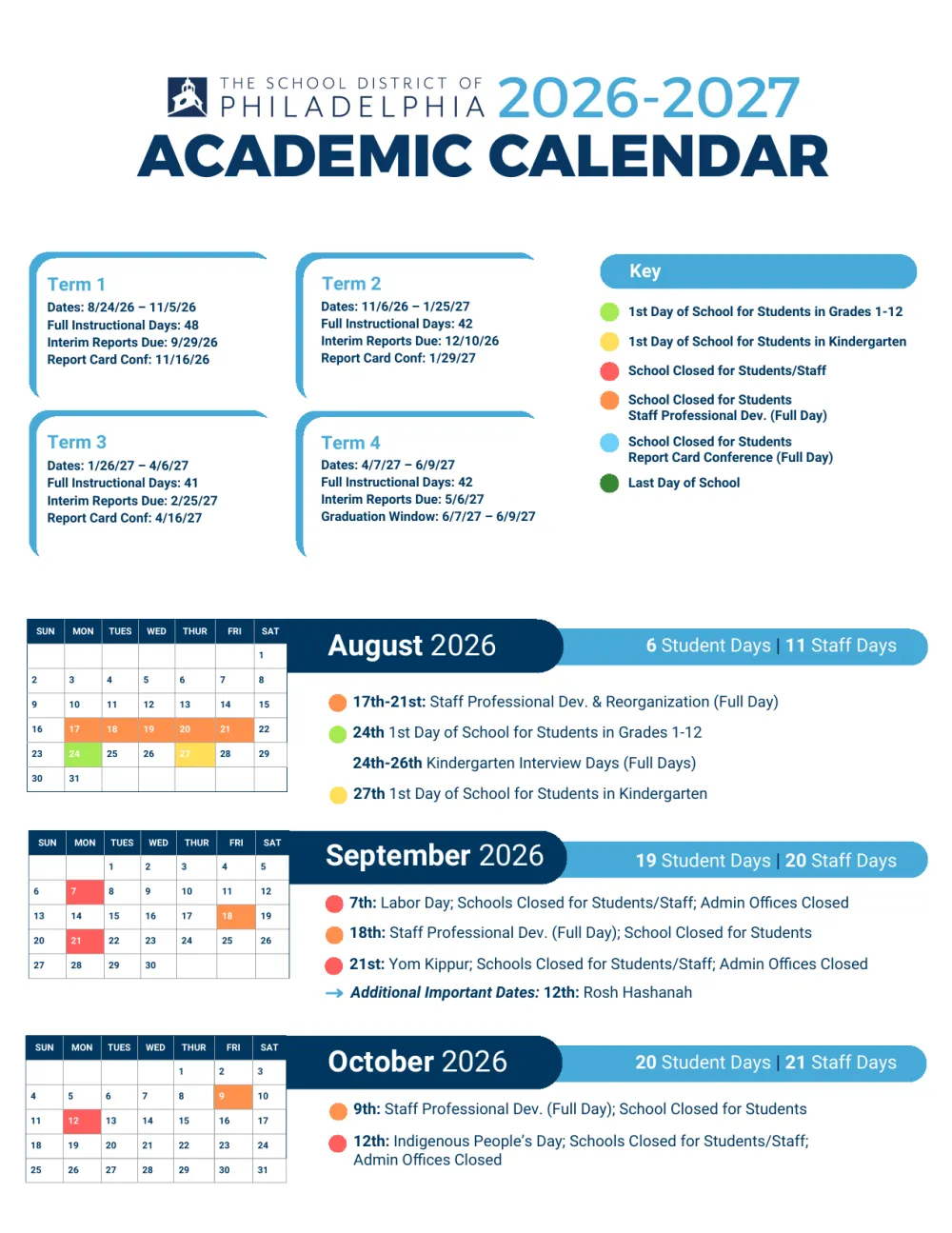
- Send Calendar Vision the schedule. Upload the PDF or a photo of the flyer, or forward the school’s email to your Calendar Vision address. From the Philadelphia PDF it made 54 all-day events, with multi-day breaks like Winter Recess as one event each.
- Sync the events you want. They go into your Calendar Vision calendar.
- Connect that calendar to the screen, once. For a tablet, subscribe to it in Google Calendar or Apple Calendar. Skylight, Hearth, DAKboard, and MagicMirror take a calendar link, so paste its address there. On an Echo Show or a Cozyla, subscribe in Google Calendar and check that the screen lists the subscribed calendar.
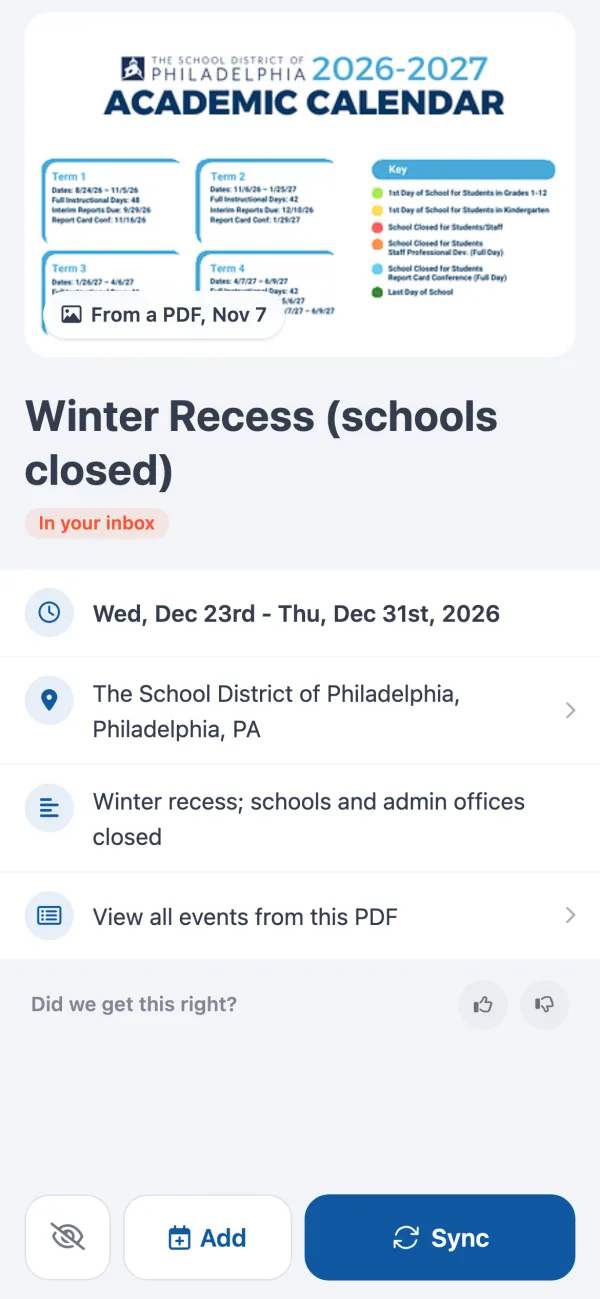
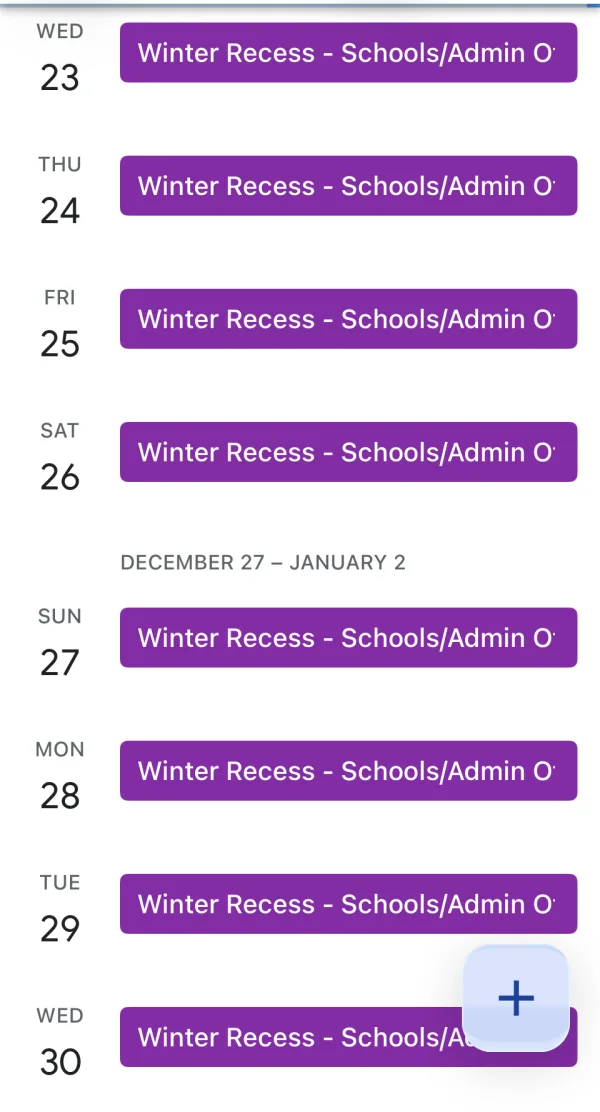
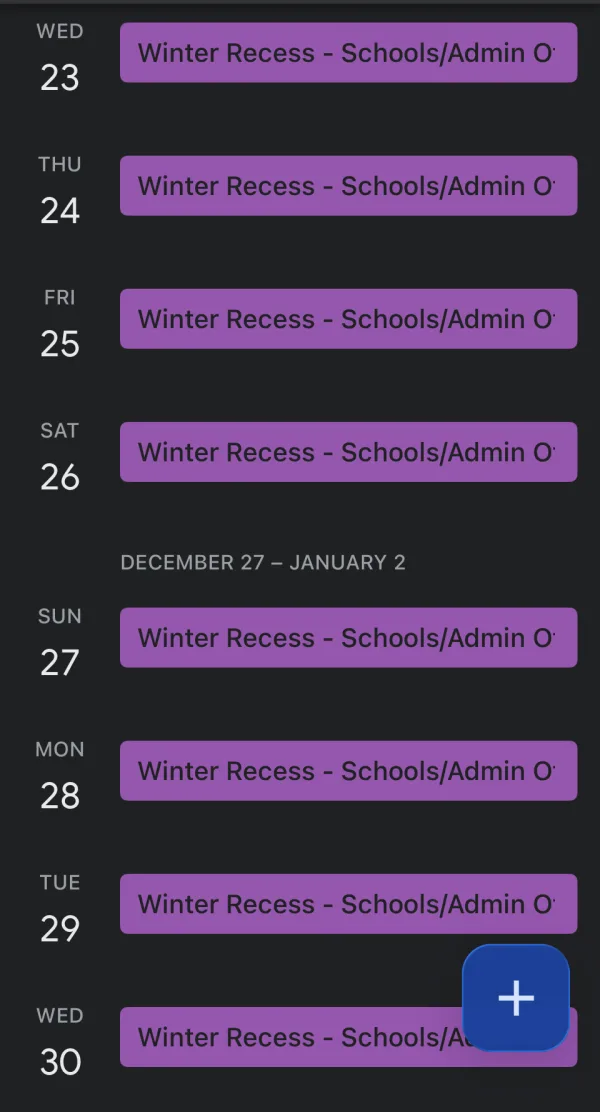
After that, Winter Recess shows up in Google Calendar like any other event, which is exactly what a tablet on the kitchen wall would show:
From then on, every school email, camp PDF, or photo of the coach’s schedule you send to Calendar Vision reaches the screen on its own. A few honest limits:
- One calendar, one color. The events arrive as one read-only calendar. Edits happen in Calendar Vision.
- Not instant. Each screen checks a linked calendar on its own schedule: DAKboard’s free plan every 60 minutes, MagicMirror every 5 minutes by default, and Google Calendar on its own timing.
- It replaces typing, not the device. You still need one of the screens above.
What it costs: Calendar Vision is free for your first 3 extractions, and Pro is $3.99 a year or a one-time $9.99 for unlimited ones. If you’re choosing between apps rather than screens, our guide to family calendar apps compares Cozi, TimeTree, FamilyWall, and the free Google and Apple family calendars.
Frequently asked questions
- Is there a calendar like Skylight that doesn't require a subscription?
- Yes. Cozyla markets its calendars as needing no subscription, an Echo Show shows linked calendars for free, and a tablet you own or a DIY MagicMirror costs nothing ongoing. Skylight itself doesn't require one either: the calendar, sync, chores, and lists are free, and Plus is optional.
- What's better than a Skylight?
- It depends on the need. Hearth is built around kids' routines, Cozyla has a 32-inch screen with no subscription, an Echo Show adds Alexa, an old tablet is free, and DAKboard or MagicMirror on a Raspberry Pi suit a family that likes projects. For the simplest touchscreen, Skylight is still a good choice.
- Which calendar is better, Skylight or Hearth?
- Hearth has the bigger 27-inch screen and is built around morning and evening routines, but more of it needs the $9 a month Family Membership. Skylight's 15-inch is cheaper at $299.99, and its free tier covers the calendar, chores, and lists.
- What is better, Skylight or Cozyla?
- Cozyla's 32-inch Calendar+ 2 is a much bigger screen with no yearly fee, at $899.99 on sale, and runs Android apps. Skylight's 15-inch Calendar 2 is $299.99 and simpler to set up. Pick Cozyla for a large wall and Skylight for a counter and the least fuss.
- Is DAKboard better than Skylight?
- DAKboard is cheaper if you build it on a Raspberry Pi with a monitor you have, and its free plan shows 2 calendars refreshed hourly. It isn't a touchscreen unless you buy DAKboard's $599.95 or $799.95 models. Skylight is the one the family can tap to add events.
- Is there a cheaper Skylight Calendar?
- Skylight sold a 10-inch model for about $160 in November 2026, against $299.99 for the 15-inch Calendar 2. Cheaper still is a tablet you already own, showing a shared Google or Apple family calendar.
- Is there a Skylight calendar dupe?
- Several touchscreen calendars do the same job, such as Cozyla's Calendar Neo from $169.99. For no new hardware, an old tablet on a stand works, and for a DIY build, DAKboard or MagicMirror turns a Raspberry Pi and a monitor into a wall calendar.
- Can I use an old iPad as a Skylight calendar?
- Yes. Put it on a stand or a wall mount, keep it plugged in, set Auto-Lock to Never under Display & Brightness, and open Google Calendar or Apple Calendar on the shared family calendar. You won't get Skylight's chore chart, but the week is on the wall for free.