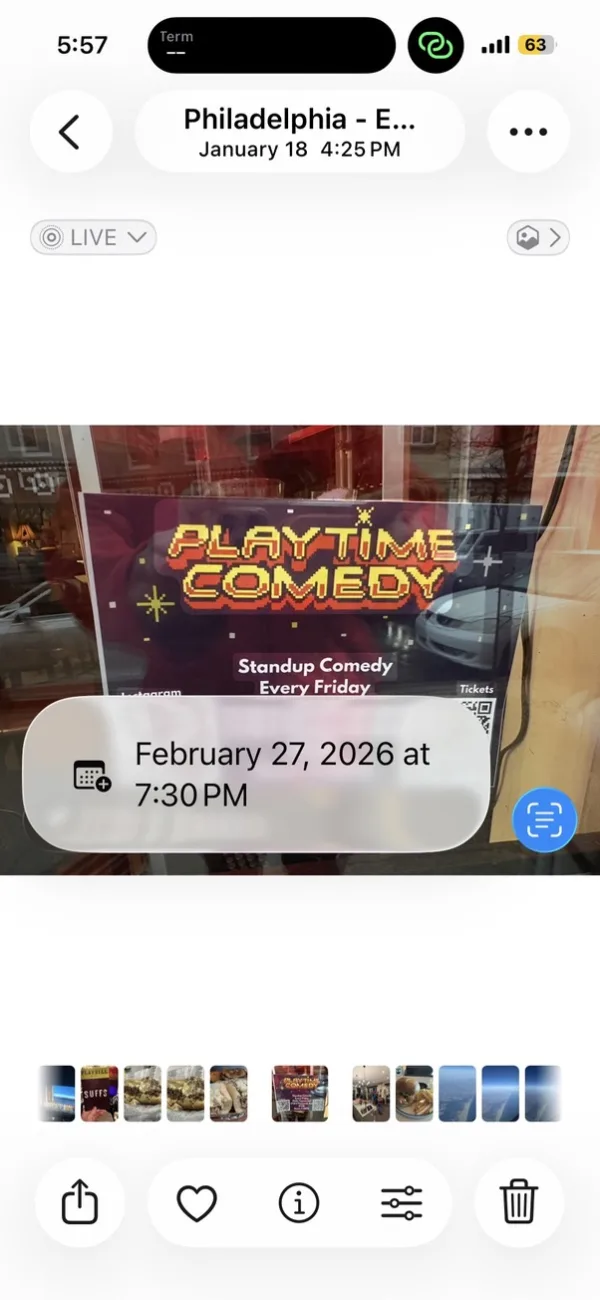
You spot a flyer in a shop window: Playtime Comedy every Friday at Philly Typewriter. You snap a photo and plan to add it to your calendar later.
That should be quick. In practice, it is not.
The iOS Photos Approach
iOS Photos can recognize text in images and offer to create a calendar event. On this flyer, it correctly finds the time: “7:30 PM.”
Tap the suggestion and iOS opens a new event. Here’s the result:

Two issues are immediate:
- The title is blank. “Playtime Comedy” is printed in giant letters on the flyer, but iOS doesn’t understand that it’s the event name — it only extracted the time.
- Repeat is set to “Never.” The flyer says “Every Friday,” but recurrence is not inferred.
Before you can save, you still have to type the title and set weekly repeat manually. The extraction is partial, so the cleanup work remains.
The Calendar Vision Approach
Calendar Vision is built for this workflow. From the same photo, open the iOS share sheet and tap Calendar Vision.

Calendar Vision reads the flyer with calendar context: “Playtime Comedy” as title, “Every Friday” as weekly recurrence, and “1735 E Passyunk Ave” as location. Your inbox shows the parsed result:

Playtime Comedy (Standup Night). Philly Typewriter. Repeats Weekly on Friday. Then tap “Add to Calendar” to create the event:

Title, address, and recurrence are already set. It is ready to save with one tap.
Side by Side
| iOS Photos | Calendar Vision | |
|---|---|---|
| Detects date & time | Yes | Yes |
| Detects event name | No | Yes |
| Detects recurring schedule | No | Yes |
| Detects location | No | Yes |
| Ready to save without editing | No | Yes |
The Bottom Line
iOS Photos is excellent general OCR. But extracting calendar events, especially recurring ones, requires understanding intent and structure, not just isolated snippets.
Calendar Vision is optimized for that specific task. It turns flyers and screenshots into complete events with fewer manual edits.
Frequently asked questions
- Can iOS Photos create a calendar event from a picture?
- Yes. iOS Photos recognizes dates and times in images and offers to create an event. In our test it found the time on a comedy flyer but left the title blank and didn't set the event to repeat, so the event still had to be finished by hand.
- Does iOS Photos detect recurring events?
- Not in our test. The flyer said "Every Friday," but the event iOS Photos created was set to repeat never. Calendar Vision read the same flyer as a weekly event on Fridays.
- How do I send a photo to Calendar Vision?
- Open the photo, tap the share button, and choose Calendar Vision from the share sheet. You can also upload images in the app or on the web, including JPEG, PNG, GIF, and PDF files, up to 10 at a time.
- Is Calendar Vision free?
- You can start free with 10 events per month and no credit card. Calendar Vision Pro removes the limit for $3.99 a month or $39.99 a year.