To get a reminder before tickets go on sale, share the presale announcement — an email, an Instagram story, or a poster — to Calendar Vision. It creates a separate calendar event for the moment tickets go on sale, marked “Tickets,” alongside the event for the show itself. Add the sale event to your calendar with an alert, and you’ll be ready when the sale opens.
Presales are easy to miss because the date that matters isn’t the show. A concert in March might have an artist presale on a Tuesday in November, a fan club presale the day before, and a general on-sale that Friday at 10 AM. That date usually sits in the middle of a newsletter or on the third slide of a story, and by the time you remember it, the good seats are gone.
Here’s how to put the sale date on your calendar so it reminds you instead of the other way around, using a real announcement email for a Leon Bridges show at the Highmark Mann in Philadelphia.
How do I add a ticket presale date to my calendar?
Step 1: Find the announcement
Presale dates usually show up in three places: an email from the venue, artist, or ticket site; an Instagram post or story; or a poster for the show. Any of them works. You don’t need to copy the date out or find a ticket link first.
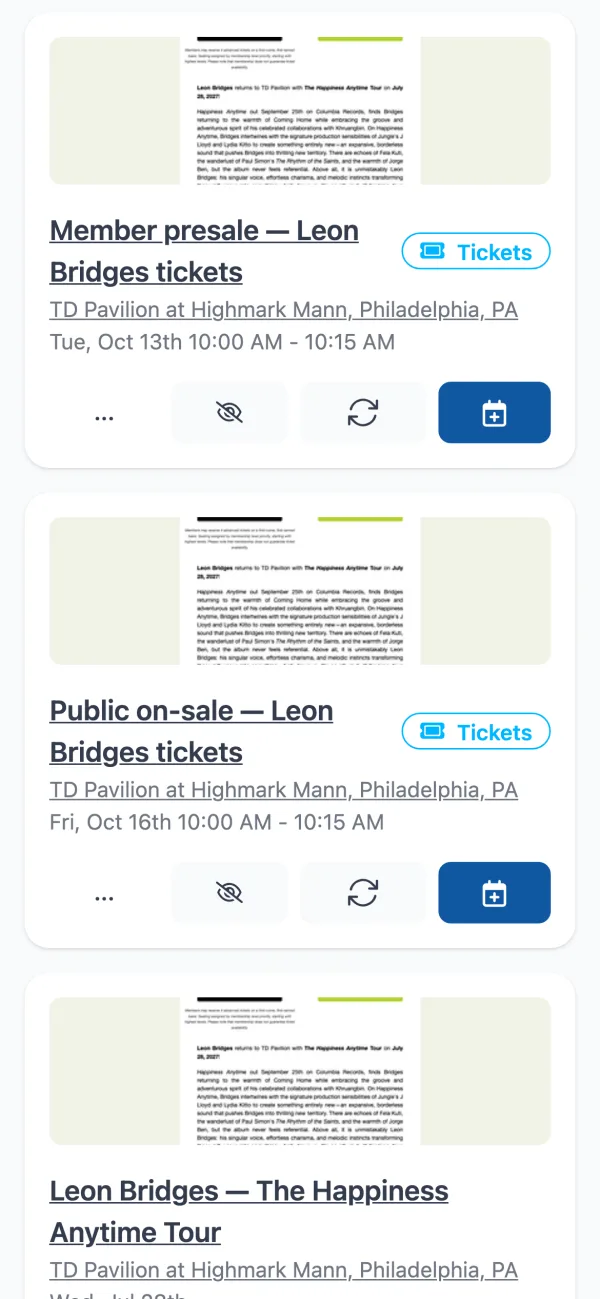
This email from the Highmark Mann announces a show on July 28, a member presale on Tuesday, October 13 at 10 AM, and the public on-sale on Friday, October 16 at 10 AM. That’s three dates in one email, and only one of them is the concert.

Step 2: Share it to Calendar Vision
For an email, forward it to Calendar Vision. For an Instagram post or a poster, take a screenshot or photo, tap Share, and choose Calendar Vision. Calendar Vision reads the whole announcement, including the fine print where presale details tend to hide.
Step 3: Check the sale and the show in your Inbox
When the announcement mentions both when tickets go on sale and when the show happens, each date becomes its own event. From the Leon Bridges email, Calendar Vision created the member presale and the public on-sale, each with a “Tickets” badge, plus the July 28 show. You can tell at a glance which events are sales and which one is the night out. Check the date and time on each, then add the sale you need to your calendar. Add the show now too, or wait until you have tickets.
What counts as a ticket sale?
Calendar Vision marks a date as a ticket sale whenever it’s the moment you can get in line, not the event itself. That includes:
- Presales: artist, fan club, venue, credit card, and early access presales.
- On-sale dates: “tickets go on sale,” “public sale,” and “tickets drop.”
- Lotteries: when a ticket lottery opens for entries.
- Registrations and RSVPs: when sign-ups open for a race, a class, a free event with limited spots, or a camp.
- Waitlists: when a waitlist opens.
So the same trick works for a 5K that sells out in an hour, a summer camp that opens registration in January, or a free museum night that takes RSVPs a week ahead.
What’s the difference between the sale event and the show event?
| Ticket sale event | Show event | |
|---|---|---|
| When | The moment tickets go on sale | The date and time of the show |
| In Calendar Vision | Marked with a “Tickets” badge | A regular event |
| On your synced calendar | Titled “Tickets: ” followed by the show name | Titled with the show name |
If an announcement lists several sales, like a member presale followed by the public on-sale, each one becomes its own event, so you can add just the one you’re eligible for.
How do I get reminded before tickets go on sale?
You have two options, and you can use both:
- Use your calendar’s alert. When you add the sale event to your phone’s calendar, set an alert 10 or 15 minutes before. That gives you time to sign in to the ticket site and find your presale code.
- Let Calendar Vision notify you. Once the event is on one of your Calendar Vision calendars, you can set a default reminder for the whole calendar or add reminders to a single event, anywhere from minutes to weeks ahead. Turn on notifications for upcoming events in Notification Settings and your phone will alert you when the reminder fires.
If you add events often, sync them instead of adding them one at a time. Synced events show up in Google Calendar, Apple Calendar, or Outlook automatically, and the “Tickets:” title makes sale events easy to spot among everything else on your calendar.
How do I make sure I get tickets?
- Check the time zone. Sale times are usually in the venue’s local time. If the announcement prints a time zone, Calendar Vision uses it; otherwise it assumes your own, so double-check before a sale for an out-of-town show.
- Watch for a registration step. Some presales require you to sign up days in advance to get a code. If the sign-up has its own deadline, that’s a separate date worth its own event.
- Sign in early. Log in to the ticket site and save your payment details before the sale starts. A reminder 15 minutes ahead is enough time.
- Add only the sales you can use. Hide the fan club or credit card presales you don’t qualify for so they don’t clutter your calendar.
Where else can I find presale announcements?
Most presale dates arrive in one of the places Calendar Vision already reads. Venue and artist newsletters are easiest to forward as an email. Tour announcements on Instagram work as screenshots — see how to turn Instagram screenshots into calendar events. And a poster on a venue door or a telephone pole works as a photo, the same way as any other flyer.
Frequently asked questions
- How do I get a reminder when tickets go on sale?
- Share the announcement to Calendar Vision. It creates a separate event for when tickets go on sale, which you can add to your calendar with an alert. Calendar Vision can also send a push notification before the sale.
- What if an announcement lists several presales?
- Each sale becomes its own event, such as one for the artist presale and one for the general on-sale, so you can add only the ones you're eligible for.
- Does it work for registrations and lotteries?
- Yes. Registration openings, RSVP openings, ticket lotteries, and waitlists are all marked as ticket sales, separate from the event itself.
- Does Calendar Vision buy tickets or give me presale codes?
- No. Calendar Vision puts the sale date on your calendar so you're ready when it opens. You still buy tickets on the ticket site.
- Is Calendar Vision free?
- You can start free with 5 extractions and no credit card. Calendar Vision Pro removes the limit for $3.99 a year or a one-time $9.99 lifetime purchase.