To add a recurring event from a flyer, share a photo of the flyer to Calendar Vision. It reads repeat patterns like “every Thursday,” “Tuesdays, Wednesdays & Thursdays, June 24–August 14,” or “1st Tuesday of each month” and creates one repeating event, with the end date if the flyer gives one. Tap “Add to Calendar” and the repeat comes with it, so the event shows up every week without retyping anything.
Repeating events are where most date-spotting tools fall short. In our iOS Photos comparison, the iPhone found the time on a flyer that said “Every Friday” but created a one-time event, so the following Friday was missing from the calendar. A flyer’s schedule is often the most useful thing on it, and the easiest to lose.
Here’s how it works, with real flyers from Philadelphia and beyond.
How do I add a recurring event from a flyer?
Step 1: Take a photo of the flyer
Get the whole flyer in the frame, especially the line with the schedule. This Passeggiata flyer from East Passyunk says “Thursdays starting at 5PM,” with no end date.

Step 2: Share it to Calendar Vision
Open the photo, tap Share, and choose Calendar Vision, or upload it from the Images tab in the app or on the web. The steps are the same as for any other flyer.
Step 3: Check the repeat line
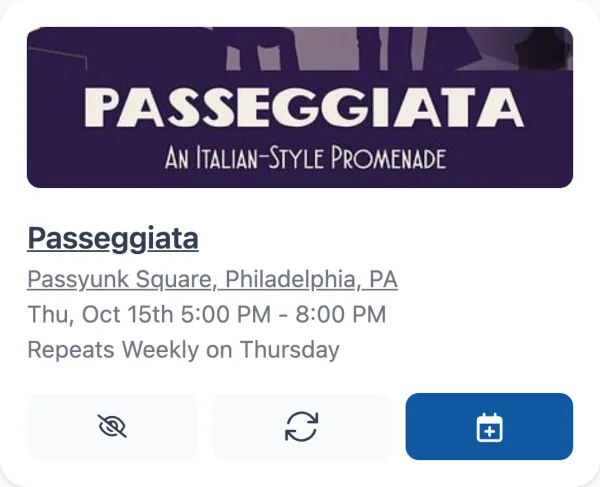
The event card shows the first date and a “Repeats” line underneath. For Passeggiata, Calendar Vision chose the next Thursday at 5:00 PM and set it to repeat weekly on Thursday, with no end date because the flyer doesn’t give one.
Step 4: Add it to your calendar
Tap “Add to Calendar.” On your phone, the new event opens with the repeat already set. On the web, the Google Calendar link and the .ics download carry the same repeat rule. If you sync events instead, the repeating event appears on your synced calendar with every future date.
What repeating patterns does Calendar Vision understand?
Each row below is a real flyer we test Calendar Vision against, and what it creates from it:
| The flyer says | Calendar Vision creates |
|---|---|
| “Thursdays starting at 5PM” | A weekly event on Thursdays at 5 PM, with no end date |
| “Tuesdays, Wednesdays & Thursdays, June 24–August 14” | One event that repeats on all three days each week, until August 14 |
| “Every Wednesday, 5 to 7 PM, June 4 to August 27” | A weekly event on Wednesdays, until August 27 |
| “Sundays in June @ 7 PM” | A weekly event on Sundays at 7 PM, from the first Sunday in June through the last |
| “Sundays from September 7 through October 12” | A weekly event on Sundays, until October 12 |
| “1st Tuesday of each month” | A monthly event on the first Tuesday |
| “Oct 4th, Nov 1st, Dec 6th” | A separate event for each date |
| “June 3–29” for a theater run | One event spanning those dates, not a repeat |
Can it handle events on several days a week?
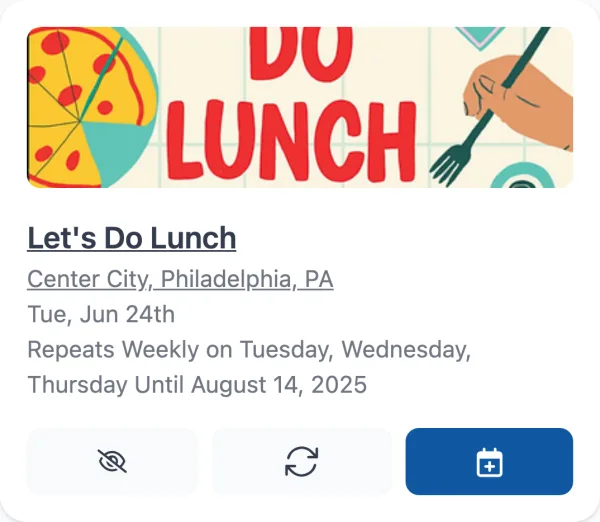
Yes. Center City’s Let’s Do Lunch runs “Tuesdays, Wednesdays & Thursdays, June 24–August 14.” Instead of three separate events, Calendar Vision creates one that repeats weekly on Tuesday, Wednesday, and Thursday and stops after August 14, the way you’d set it up by hand.

What about “first Tuesday of the month”?
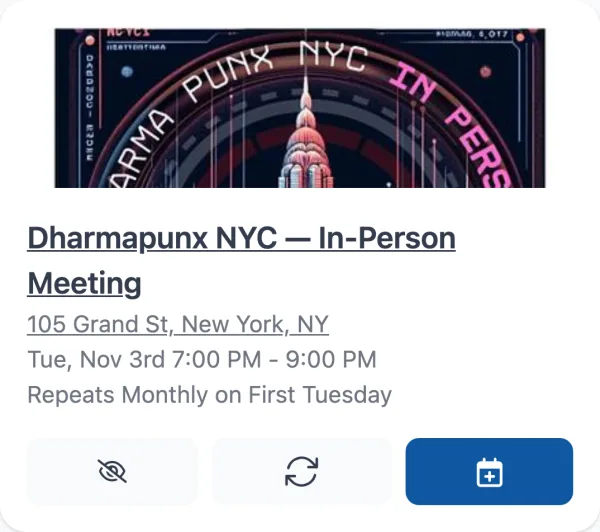
Monthly patterns tied to a weekday work too. A screenshot of the Dharma Punx NYC website, which says “1st Tuesday of each month” and “7PM at 105 Grand,” becomes an event at 7:00 PM on the next first Tuesday that repeats monthly on the first Tuesday.
What if one photo has several recurring events?
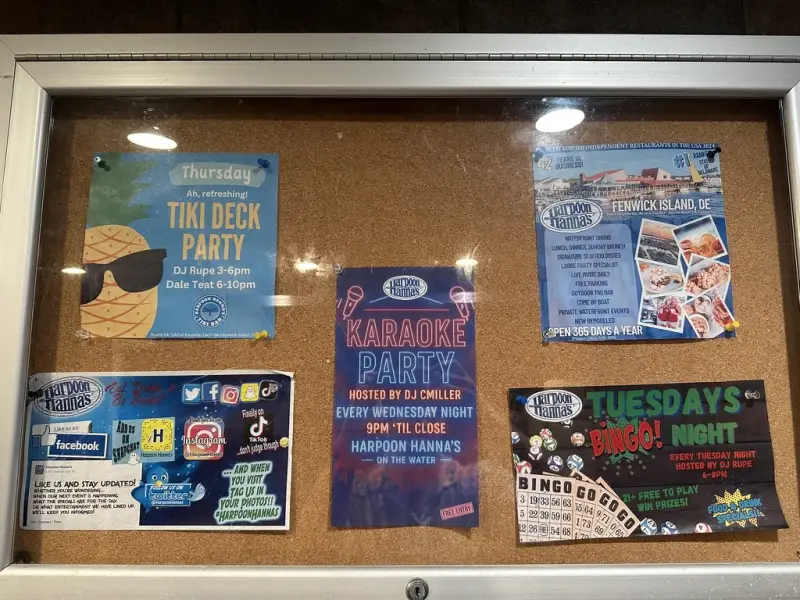
Each one becomes its own repeating event. This photo of a bulletin board at Harpoon Hanna’s in Fenwick Island, Delaware, has three flyers on it. Calendar Vision created three weekly events from the one photo: Bingo Night on Tuesdays from 6 to 8 PM, a Karaoke Party on Wednesdays from 9 PM, and a Tiki Deck Party on Thursdays from 3 to 10 PM.
When does a flyer not become a recurring event?
Not every flyer with several dates should repeat, and Calendar Vision tells the difference:
- A list of specific dates becomes one event per date. East Passyunk’s Fall First Fridays flyer lists October 4, November 1, and December 6, so you get three events, as shown in our photo-to-calendar walkthrough. Only a rule like “every first Friday” becomes a repeating event.
- A run of performances like “June 3–29” for a play becomes one event spanning those dates, so your calendar isn’t filled with a month of daily copies.
- A multi-day conference or festival becomes one event covering both days instead of a daily repeat.
How do I get the best results with recurring events?
- Include the schedule line. “Every Thursday” is often in small print at the bottom of a flyer. If it’s cut off, you’ll get a one-time event.
- Check the end date. Seasonal events like summer series usually print one. If the flyer says “through August,” make sure the repeat stops where you expect.
- Watch flyers without a year. Calendar Vision picks the next matching date, so an old flyer from last summer may land in the past. Events that have already ended are moved to your ignored events, so check the year before you add them.
- Edit before you add. If the repeat isn’t right, tap Edit and change how often it repeats, which days, or when it ends.
Frequently asked questions
- Can I add a recurring event from a photo of a flyer?
- Yes. Share the photo to Calendar Vision and it reads patterns like "every Thursday" or "1st Tuesday of each month," then creates one repeating event you can add to your calendar with the repeat already set.
- Does it pick up the end date?
- Yes, when the flyer gives one. "Every Wednesday, June 4 to August 27" repeats weekly until August 27. A flyer with no end date, like "Thursdays starting at 5PM," repeats with no end.
- What if the flyer lists specific dates instead of a pattern?
- Each listed date becomes its own event. Only a rule like "every first Friday" becomes a repeating event.
- Can I change the repeat if it's wrong?
- Yes. Tap Edit on the event to change how often it repeats, which days, and when it ends before you add it to your calendar.
- Is Calendar Vision free?
- You can start free with 5 extractions and no credit card. Calendar Vision Pro removes the limit for $3.99 a year or a one-time $9.99 lifetime purchase.